> ## Documentation Index
> Fetch the complete documentation index at: https://trigger-v3-fix-additional-files.mintlify.site/llms.txt
> Use this file to discover all available pages before exploring further.
# Deploy to Fly.io
> Deploy self hosted version of [Trigger.dev](https://trigger.dev) to Fly.io
You can use this [repository](https://github.com/triggerdotdev/fly.io) as a jumping off point for deploying a self-hosted version of Trigger.dev on Fly.io using the Trigger.dev public docker image located at `ghcr.io/triggerdotdev/trigger.dev:latest`
## Fork the repository mentioned above and change the app name
You should fork the repository before starting so you can make changes and commit them. For example, you'll need to change the `app` property in the `fly.toml` file to be something other than `app = "trigger-v2-fly-demo"`.
## Install and configure the fly.io CLI
1. Install the Fly CLI tool:
```sh Mac
brew install flyctl
```
```sh Linux
curl -L https://fly.io/install.sh | sh
```
```sh Windows
pwsh -Command "iwr https://fly.io/install.ps1 -useb | iex"
```
2. Authenticate the CLI:
```sh
fly auth login
```
## Create the fly.io app and pg db
1. Launch the app:
```sh
fly launch
```
2. Follow the prompts by `fly launch` and make sure to answer them in the following way:
Do NOT get rid of your terminal output, we will need your database connection string shortly.
```sh
? Would you like to copy its configuration to the new app? Yes
? Choose an app name (leaving blank will default to 'trigger-v2-fly-demo')
? Would you like to set up a Postgresql database now? Yes
? Select configuration: Development - Single node, 1x shared CPU, 256MB RAM, 1GB disk <- feel free to pick a beefier machine
? Would you like to set up an Upstash Redis database now? No
? Would you like to deploy now? No
```
## Gather your secret environment variables
### Required
1. `MAGIC_LINK_SECRET`, `SESSION_SECRET` and `ENCRYPTION_KEY`
All of these secrets should be 16-byte random strings, which you can easily generate (and copy into your pasteboard) with the following command:
```sh
openssl rand -hex 16 | pbcopy
```
2. `LOGIN_ORIGIN` and `APP_ORIGIN`
Both of these secrets should be set to the base URL of your fly application. For example `https://trigger-v2-fly-demo.fly.dev`
3. `DIRECT_URL`
This needs to match the value of `DATABASE_URL` which was printed to your terminal after the creation step above:
```sh
The following secret was added to :
DATABASE_URL=postgres://postgres:@.flycast:5432/?sslmode=disable
```
### Optional
`AUTH_GITHUB_CLIENT_ID` and `AUTH_GITHUB_CLIENT_SECRET`
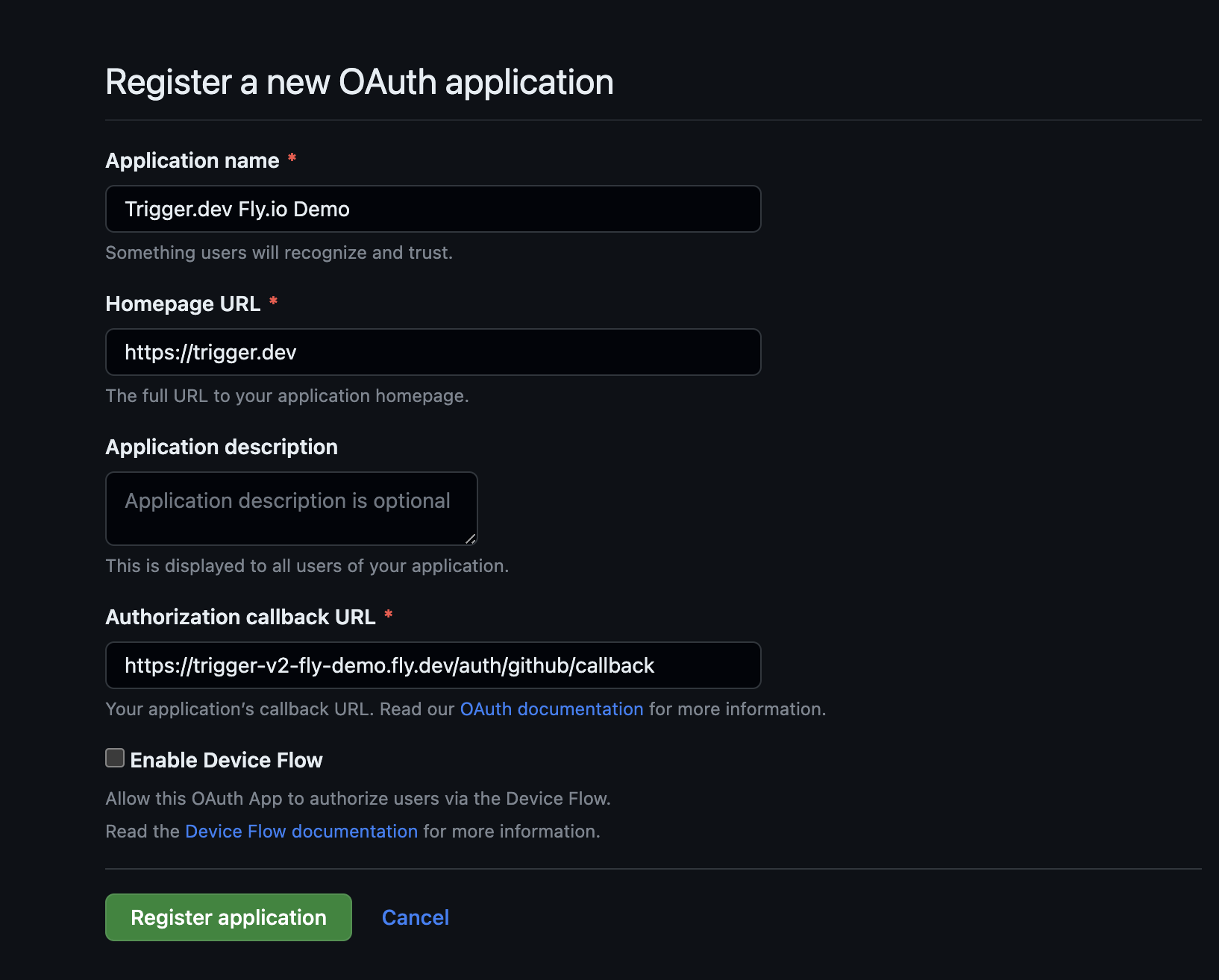
1. If you plan on logging in with GitHub auth, you'll need to create a GitHub OAuth app with the following configuration:
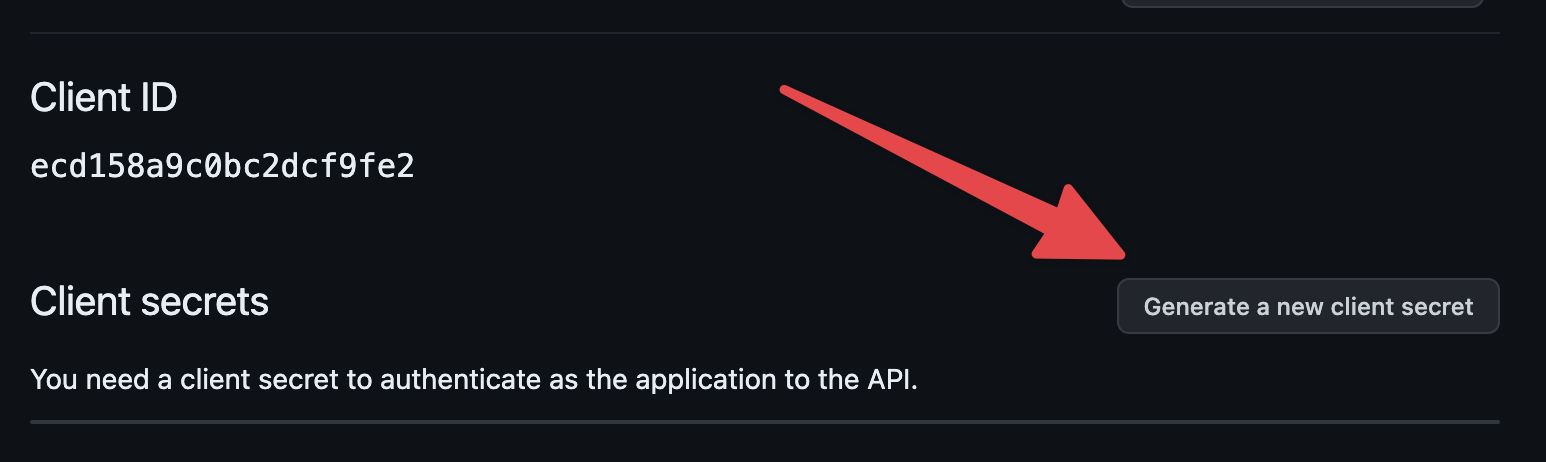
2. Once you register the application you'll need to click on the "Generate new client secret" button:
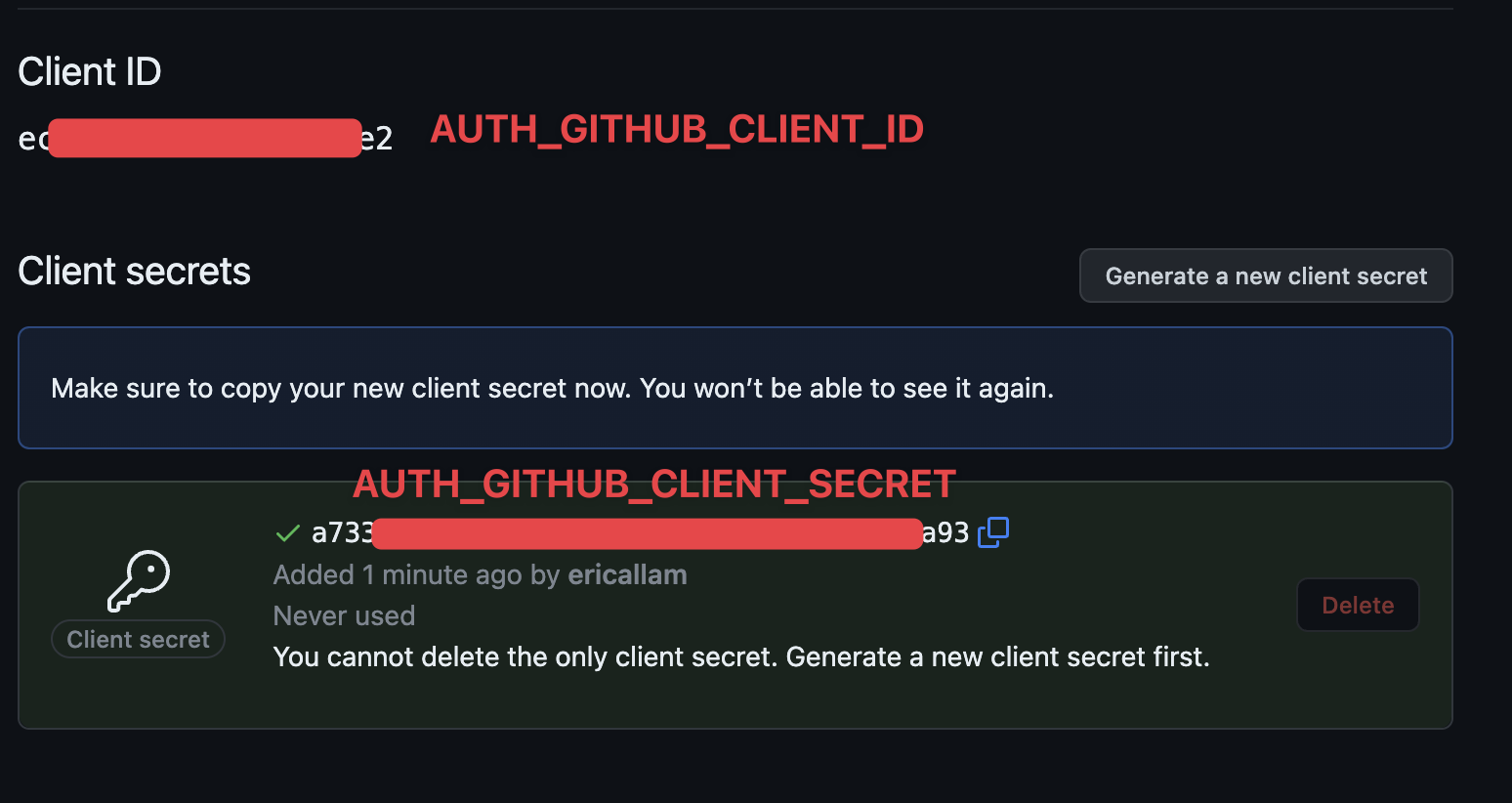
3. And then you can copy out the AUTH\_GITHUB\_CLIENT\_ID and AUTH\_GITHUB\_CLIENT\_SECRET:
`RESEND_API_KEY`, `FROM_EMAIL` and `REPLY_TO_EMAIL`
We use [Resend.com](https://resend.com) for email sending (including the magic-link signup/login system). They have a generous free tier of 100 emails a day that should be sufficient. Signup for Resend.com and enter the environment vars below
## Set the secrets
Call the `fly secrets set` command to stage the secrets to be used on first deploy:
```sh
fly secrets set \
ENCRYPTION_KEY= \
MAGIC_LINK_SECRET= \
SESSION_SECRET= \
LOGIN_ORIGIN="https://.fly.dev" \
APP_ORIGIN="https://.fly.dev" \
DIRECT_URL="postgres://postgres:@.flycast:5432/?sslmode=disable" \
FROM_EMAIL="Acme Inc. " \
REPLY_TO_EMAIL="Acme Inc. " \
RESEND_API_KEY= \
AUTH_GITHUB_CLIENT_ID= \
AUTH_GITHUB_CLIENT_SECRET=
Secrets are staged for the first deployment
```
## Deploy
Now you can deploy to fly. Here we are setting the machine VM size to use 1 dedicated CPU core with 2 GB of memory, but you can run `fly platform vm-sizes` to see other options. The below app will cost about \$30/month.
```sh
fly deploy --vm-size performance-1x
```
## Visit and create an account
Once deployed, you should be able to open `https://.fly.dev/` in your browser and create an account, either using GitHub or a magic email link.
## Initialize your Next.js project
Next you can easily bootstrap your Next.js project to use your self-hosted instance of Trigger.dev.
First, `cd` into your Next.js project, then run the `@trigger.dev/cli init` command to initialize your Next.js project:
```sh
npx @trigger.dev/cli@latest init -t "https://.fly.dev"
```
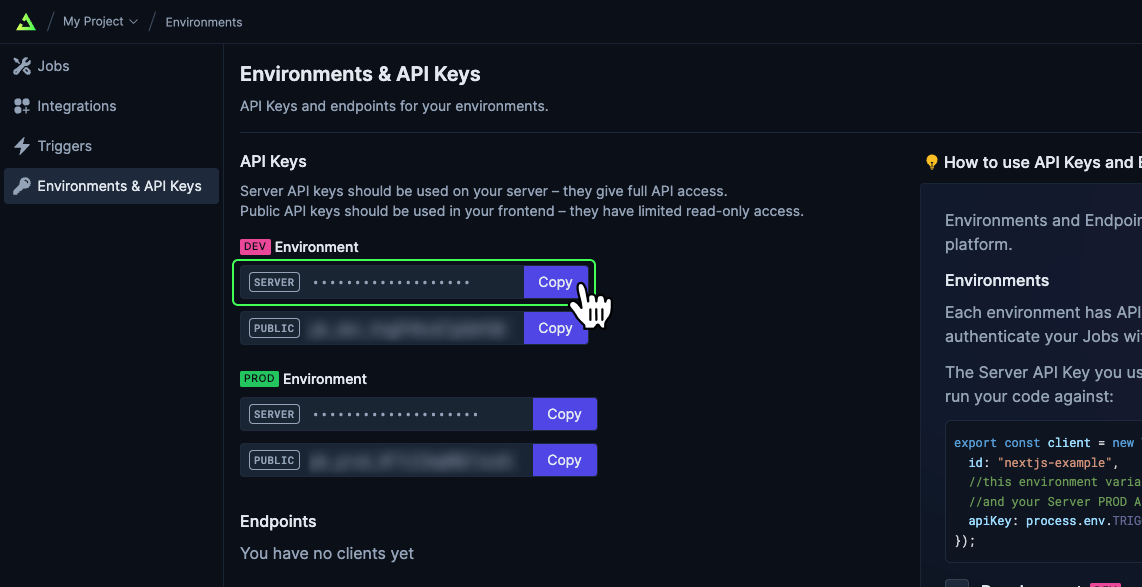
When it asks for your development API key, head over to your self-hosted Trigger.dev dashboard and select the initial project you created when signing up, and head to the `Environments & API Keys` page to copy your `dev` API key:
## Start your dev server
Run your Next.js project dev server with `npm run dev` and then in a new terminal window you will need to run the `@trigger.dev/cli dev` command to connect to your Trigger.dev instance and allow it to tunnel to your local Next.js server:
```sh
npx @trigger.dev/cli@latest dev
```
At this point you should be able to navigate to your Trigger.dev dashboard and view your registered jobs