> ## Documentation Index
> Fetch the complete documentation index at: https://trigger-v3-fix-additional-files.mintlify.site/llms.txt
> Use this file to discover all available pages before exploring further.
# API Keys and Personal Access Tokens
> Lots of APIs use API Keys or Personal Access Tokens to authenticate. This guide will show you how to use them.
## 1. Create an Integration client
```ts
//1. Import the Integration packages you want to use
import { Github } from "@trigger.dev/github";
import { OpenAI } from "@trigger.dev/openai";
//2. Create a new instance of the Integration client
// GitHub uses personal access tokens so the param is called `token`
const github = new Github({
//this is used to identify the connection
id: "github",
token: process.env.GITHUB_TOKEN!,
});
// OpenAI uses API keys so the param is called `apiKey`
const openai = new OpenAI({
//this is used to identify the connection
id: "openai",
apiKey: process.env.OPENAI_API_KEY!,
});
```
Note that we used `process.env.GITHUB_TOKEN` and `process.env.OPENAI_API_KEY`. They're environment variables, which are a way of not putting secret values directly in your code.
For Next.js, local environment variables usually live in a `.env.local` file in the root of the project.
```bash .env.local
#...other variables above here
GITHUB_TOKEN="github_pat_1234567890xxxxxxxxxxxxxxxxxxxx"
OPENAI_API_KEY="sk-12345678xxxxxxxxxxxxxxxxxxxxxxxx"
```
## 2. Use the Integration client
There are two way to use Integrations in a Job:
* You can perform Tasks in the `run` function, by passing the Integration client into the `integrations` object.
* You can use webhooks to Trigger a Job.
This example automatically assigns "matt-aitken" to any new issue in the `trigger.dev` repo (lucky him).
```ts
client.defineJob({
id: "assign-on-issue-opened",
name: "Assign on Issue Opened",
version: "0.1.0",
//1. If you want to use the Integration in the run function, add it here
integrations: { github },
//2. If the Integration supports webhooks, you can use them here
trigger: github.triggers.repo({
event: events.onIssueOpened,
owner: "triggerdotdev",
repo: "trigger.dev",
}),
run: async (payload, io, ctx) => {
//3. Because we add `github` to Integrations, it comes through to `io.github` here
const assignee = await io.github.addIssueAssignees("add assignee", {
owner: payload.repository.owner.login,
repo: payload.repository.name,
issueNumber: payload.issue.number,
assignees: ["matt-aitken"],
});
return assignee;
},
});
```
## 3. Viewing connections in the dashboard
### The Integrations page
### Connected API Key Integration detail page
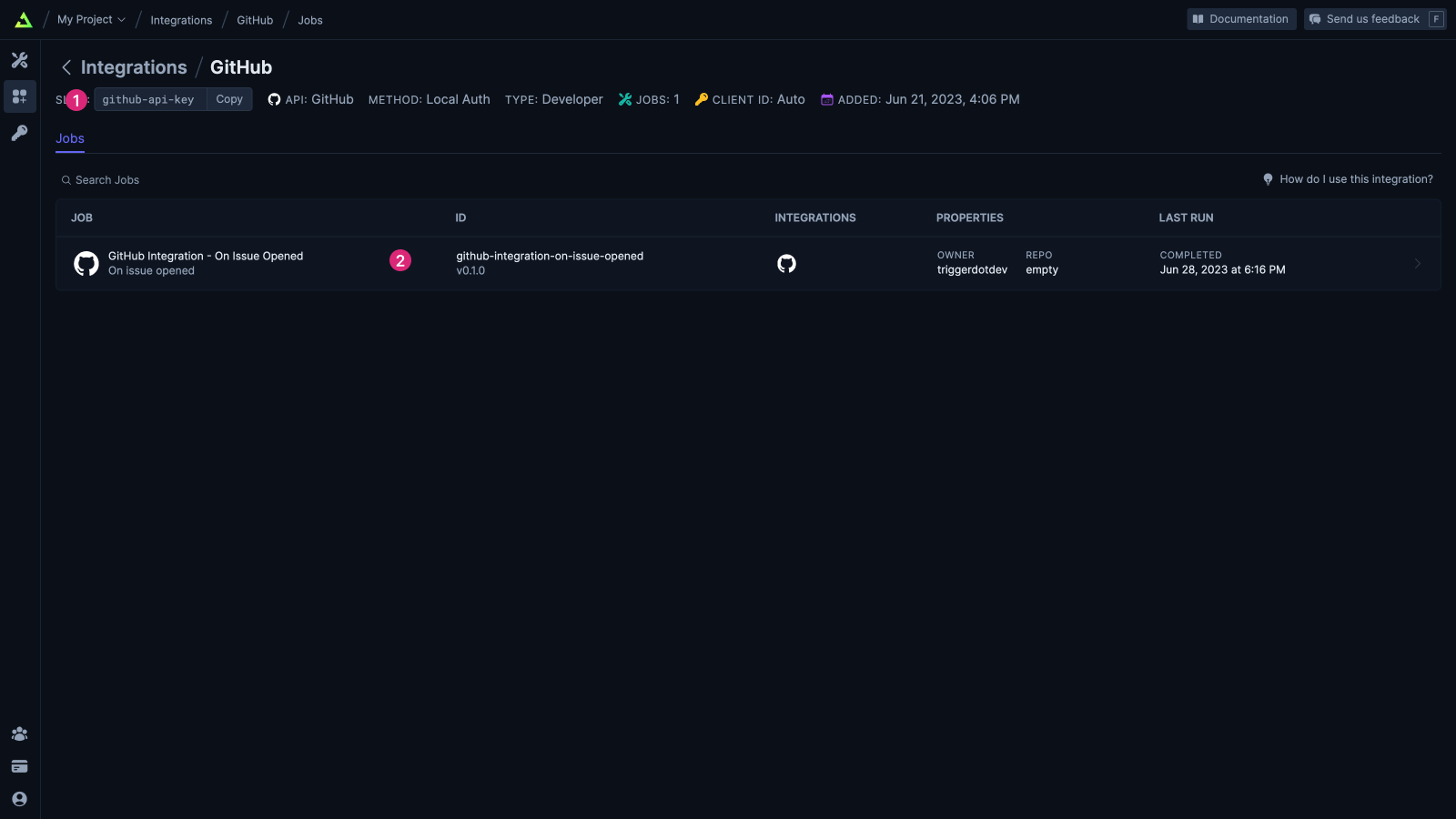
Some useful things on this page
1. The `id` that you gave the connection when you defined it in your code
2. The Jobs that are using this connection
## References
Trigger.dev integrates with a wide range of services.