> ## Documentation Index
> Fetch the complete documentation index at: https://trigger-v3-fix-additional-files.mintlify.site/llms.txt
> Use this file to discover all available pages before exploring further.
# Bring Your Own Auth
> Use Auth Resolvers to provide custom authentication credentials
In the previous guides we've covered how you can use our integrations with [API Keys](/documentation/guides/using-integrations-apikeys) or [OAuth](/documentation/guides/using-integrations-oauth), but in both cases those authentication credentials belong **to you** the developer.
If you want to use our integrations using auth credentials of **your users** you can use an Auth Resolver which allows you to implement your own custom auth resolving using a third-party service like [Clerk](https://clerk.com/) or [Nango](https://www.nango.dev/)
In this guide we'll demonstrate how to use Clerk.com's [Social Connections](https://clerk.com/docs/authentication/social-connections/oauth) to allow you to make requests with your user's Slack credentials and the official Trigger.dev [Slack integration](/integrations/apis/slack)
We won't be covering how to setup Clerk.com and their Social Connections to get the auth. This
guide assumes you already have all that setup.
## 1. Install the Slack integration package
## 2. Create a Slack integration
```ts slack.ts
import { Slack } from "@trigger.dev/slack";
const byoSlack = new Slack({
id: "byo-slack",
});
```
## 3. Define an Auth Resolver
Using your `TriggerClient` instance, define a new Auth Resolver for the `slack` integration:
```ts slack.ts
import { Slack } from "@trigger.dev/slack";
// Import your TriggerClient instance. This is merely an example of how you could do it
import { client } from "./trigger";
const byoSlack = new Slack({
id: "byo-slack",
});
client.defineAuthResolver(byoSlack, async (ctx) => {
// this is where we'll use the clerk backend SDK
});
```
## 4. Define a job
Before we finish the Slack Auth Resolver, let's create an example job that uses the Slack integration:
```ts slack.ts
import { z } from "zod";
client.defineJob({
id: "post-a-message",
name: "Post a Slack Message",
version: "1.0.0",
trigger: eventTrigger({
name: "post.message",
schema: z.object({
text: z.string(),
channel: z.string(),
}),
}),
integrations: {
slack: byoSlack,
},
run: async (payload, io, ctx) => {
await io.slack.postMessage("💬", {
channel: payload.channel,
text: payload.text,
});
},
});
```
As you can see above, we're passing the `byoSlack` integration into the Job and using it by calling `io.slack.postMessage`.
## 5. Install the Clerk backend SDK
```bash npm
npm install @clerk/backend@latest
```
```bash pnpm
pnpm install @clerk/backend@latest
```
```bash yarn
yarn add @clerk/backend@latest
```
## 6. Import and initialize the Clerk SDK
```ts slack.ts
import { Clerk } from "@clerk/backend";
// Clerk is not a class so the omission of `new Clerk` here is on purpose
const clerk = Clerk({ apiKey: process.env.CLERK_API_KEY });
```
## 7. Implement the Auth Resolver
Now we'll implement the Auth Resolver to provide authentication credentials saved in Clerk.com for Job runs, depending on the account ID of the run.
```ts slack.ts
client.defineAuthResolver(slack, async (ctx) => {
if (!ctx.account?.id) {
return;
}
const tokens = await clerk.users.getUserOauthAccessToken(ctx.account.id, "oauth_slack");
if (tokens.length === 0) {
throw new Error(`Could not find Slack auth for account ${ctx.account.id}`);
}
return {
type: "oauth",
token: tokens[0].token,
};
});
```
The first parameter to the Auth Resolver callback is the run context ([reference docs](/sdk/context)), which optionally contains an associated account (more on this below).
If the Auth Resolver returns undefined or throws an Error, any Job Run that uses the `byoSlack`
integration will fail with an "Unresolved auth" error.
## Bonus: Multiple Slack integration clients
If you want to also use Slack with your own authentication credentials, you can always create *another* slack integration with a different `id`.
```ts slack.ts
const ourSlack = new Slack({ id: "our-slack" });
client.defineJob({
id: "post-a-message",
name: "Post a Slack Message",
version: "1.0.0",
trigger: eventTrigger({
name: "post.message",
schema: z.object({
text: z.string(),
channel: z.string(),
}),
}),
integrations: {
byoSlack: byoSlack,
ourSlack: ourSlack,
},
run: async (payload, io, ctx) => {
await io.byoSlack.postMessage("💬", {
channel: payload.channel,
text: payload.text,
});
await io.ourSlack.postMessage("📢", {
channel: "C01234567",
text: `We just sent the following message to ${ctx.account?.id}: ${payload.text}`,
});
},
});
```
# How to Trigger Job runs with an Account ID
Now that we have a working Clerk.com Auth Resolver for Slack we're ready to start triggering jobs with an associated account ID. The way you do this is different depending on the Trigger type.
## Event Triggers
Jobs that have [Event Triggers](/documentation/concepts/triggers/events) can be run with an associated account by providing an `accountId` when calling `sendEvent`:
```ts backend.ts
// This is an instance of `TriggerClient`
await client.sendEvent(
{
name: "post.created",
payload: { id: "post_123" },
},
{
accountId: "user_123",
}
);
```
The `accountId` value is completely arbitrary and doesn't map to anything inside Trigger.dev, but generally it should be a unique ID that can be used to lookup Auth credentials in your Auth Resolvers.
You can also send events with an associated account ID from the run of another job:
```ts anotherJob.ts
client.defineJob({
id: "event-1",
name: "Run when the foo.bar event happens",
version: "0.0.1",
trigger: eventTrigger({
name: "foo.bar",
}),
run: async (payload, io, ctx) => {
//send an event using `io`
await io.sendEvent(
"🎫",
{
name: "post.created",
payload: { id: "post_123" },
},
{
accountId: "user_123",
}
);
},
});
```
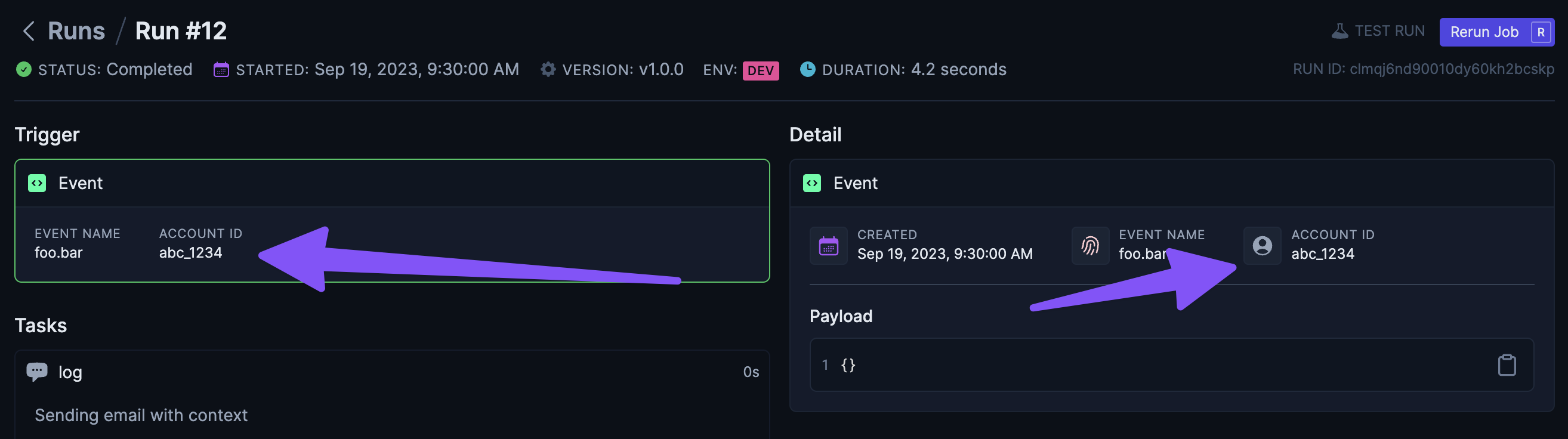
When a run is triggered with an associated account ID, you'll see the account ID in the run dashboard:
## Scheduled Triggers
Running a job with an associated account ID that is triggered by a [Scheduled Trigger](/documentation/concepts/triggers/scheduled) works a bit differently than Event Triggers as you'll need to convert your normal `intervalTrigger` or `cronTrigger` into using a [Dynamic Schedule](/documentation/concepts/triggers/dynamic#dynamicschedule) and then registering schedules with an associated account ID.
### 1. Convert a job to using a Dynamic Schedule
First let's convert the following job from an `intervalTrigger` to a Dynamic Schedule:
```ts dynamicSchedule.ts
// Before
client.defineJob({
id: "scheduled-job",
name: "Scheduled Job",
version: "1.0.0",
trigger: intervalTrigger({
seconds: 60,
}),
run: async (payload, io, ctx) => {
await io.logger.info("This runs every 60 seconds");
},
});
// After
export const dynamicInterval = client.defineDynamicSchedule({ id: "my-schedule" });
client.defineJob({
id: "scheduled-job",
name: "Scheduled Job",
version: "1.0.0",
trigger: dynamicInterval,
run: async (payload, io, ctx) => {
await io.logger.info("This runs dynamic schedules");
},
});
```
As you can see above, we've dropped the specific interval when defining the trigger as that will now be specific when registering schedules.
### 2. Register a schedule
You can now use the `dynamicInterval` instance to register a schedule, which will trigger the `scheduled-job`:
```ts backend.ts
import { dynamicInterval } from "./dynamicSchedule";
// Somewhere in your backend
await dynamicInterval.register("schedule_123", {
type: "interval",
options: { seconds: 60 },
accountId: "user_123", // associate runs triggered by this schedule with user_123
});
```
As you can see above, we've associated this registered schedule with an `accountId`, so any runs triggered by this schedule will be associated with `"user_123"`
The first parameter above `"schedule_123"` is the Schedule ID and can be used to unregister the schedule at a later point:
```ts backend.ts
import { dynamicInterval } from "./dynamicSchedule";
// Somewhere in your backend
await dynamicInterval.unregister("schedule_123");
```
You can also use register/unregister inside another job run and it will automatically create a [Task](/documentation/concepts/tasks):
```ts otherJob.ts
import { dynamicInterval } from "./dynamicSchedule";
client.defineJob({
id: "event-1",
name: "Run when the foo.bar event happens",
version: "0.0.1",
trigger: eventTrigger({
name: "foo.bar",
}),
run: async (payload, io, ctx) => {
await dynamicInterval.register("schedule_123", {
type: "interval",
options: { seconds: 60 },
accountId: "user_123", // associate runs triggered by this schedule with user_123
});
},
});
```
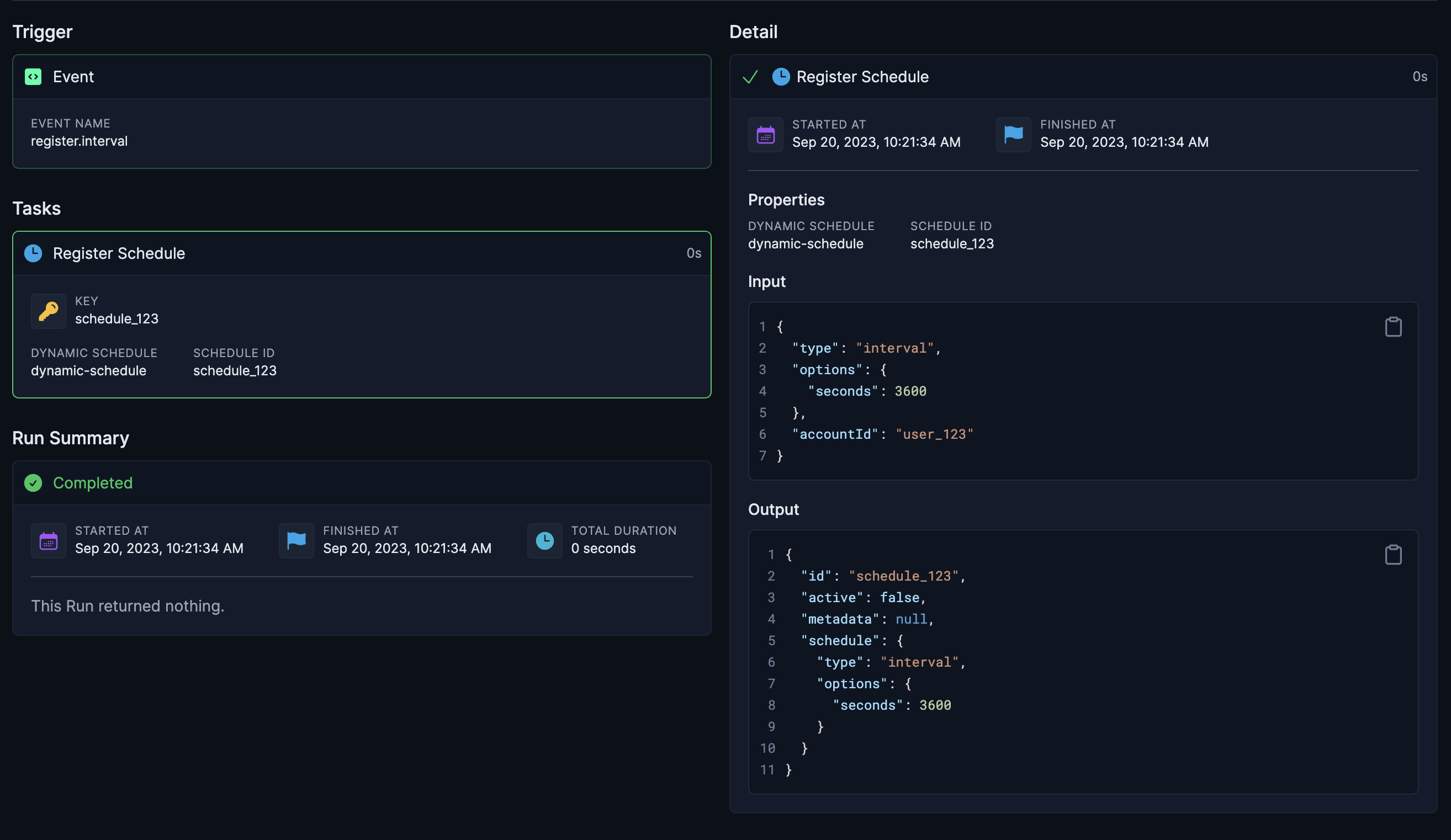
Will produce the following run dashboard:
If you will only ever add a single schedule for a user on a given Dynamic Schedule, you can just
use the accountId as the Schedule ID
```ts
const accountId = "user_123";
await dynamicInterval.register(accountId, {
type: "interval",
options: { seconds: 60 },
accountId,
});
```
## Webhook Triggers
Running a job with an associated account ID that is triggered by a [Webhook Trigger](/documentation/concepts/triggers/webhook) requires converting to the use of a [Dynamic Trigger](/documentation/concepts/triggers/dynamic#dynamictrigger)
Dynamic Trigger's work very similarly to Dynamic Schedules, but instead of registering schedules, you register triggers:
Using the GitHub integration we'll create a Dynamic Trigger that is triggered by the `onIssueOpened` event:
```ts github.ts
import { Github, events } from "@trigger.dev/github";
const github = new Github({
id: "github",
});
const dynamicOnIssueOpenedTrigger = client.defineDynamicTrigger({
id: "github-issue-opened",
event: events.onIssueOpened,
source: github.sources.repo,
});
```
Now we'll use the Dynamic Trigger to define a Job that is triggered by it:
```ts github.ts
client.defineJob({
id: "listen-for-dynamic-trigger",
name: "Listen for dynamic trigger",
version: "0.1.1",
trigger: dynamicOnIssueOpenedTrigger,
integrations: {
github,
},
run: async (payload, io, ctx) => {
await io.github.issues.createComment("create-issue-comment", {
owner: payload.repository.owner.login,
repo: payload.repository.name,
issueNumber: payload.issue.number,
body: "First! 🥇",
});
},
});
```
Define an Auth Resolver to fetch the GitHub OAuth token from Clerk.com:
```ts github.ts
client.defineAuthResolver(github, async (ctx) => {
if (!ctx.account?.id) {
return;
}
const tokens = await clerk.users.getUserOauthAccessToken(ctx.account.id, "oauth_github");
if (tokens.length === 0) {
throw new Error(`Could not find GitHub auth for account ${ctx.account.id}`);
}
return {
type: "oauth",
token: tokens[0].token,
};
});
```
If you are using clerk, you'll probably want to [Add additional
scopes](https://clerk.com/docs/authentication/social-connections/oauth#request-additional-o-auth-scopes-after-sign-up)
to be able to do useful things with the GitHub integration. For example, if you plan on
registering GitHub triggers you'll need `write:repo_hook` and `read:repo_hook` or just
`admin:repo_hook`. If you want to create issues you'll need `repo` or `public_repo`.
Finally, we can register a new Trigger at "runtime", either inside another Job run or in your backend:
```ts github.ts
// Register inside another job run:
client.defineJob({
id: "register-issue-opened",
name: "Register Issue Opened for Account",
version: "0.0.1",
trigger: eventTrigger({
name: "register.issue.opened",
}),
run: async (payload, io, ctx) => {
// This will automatically create a task in this run with the `payload.id` as the Task Key.
await dynamicOnIssueOpenedTrigger.register(
payload.id,
{
owner: payload.owner,
repo: payload.repo,
},
{
accountId: payload.accountId,
}
);
},
});
// Register in your backend:
// This skips creating a Task since it's outside a job and will just call our backend API directly
async function registerIssueOpenedTrigger(
id: string,
owner: string,
repo: string,
accountId?: string
) {
return await dynamicOnIssueOpenedTrigger.register(
id,
{
owner,
repo,
},
{
accountId,
}
);
}
```
# Testing jobs with Account ID
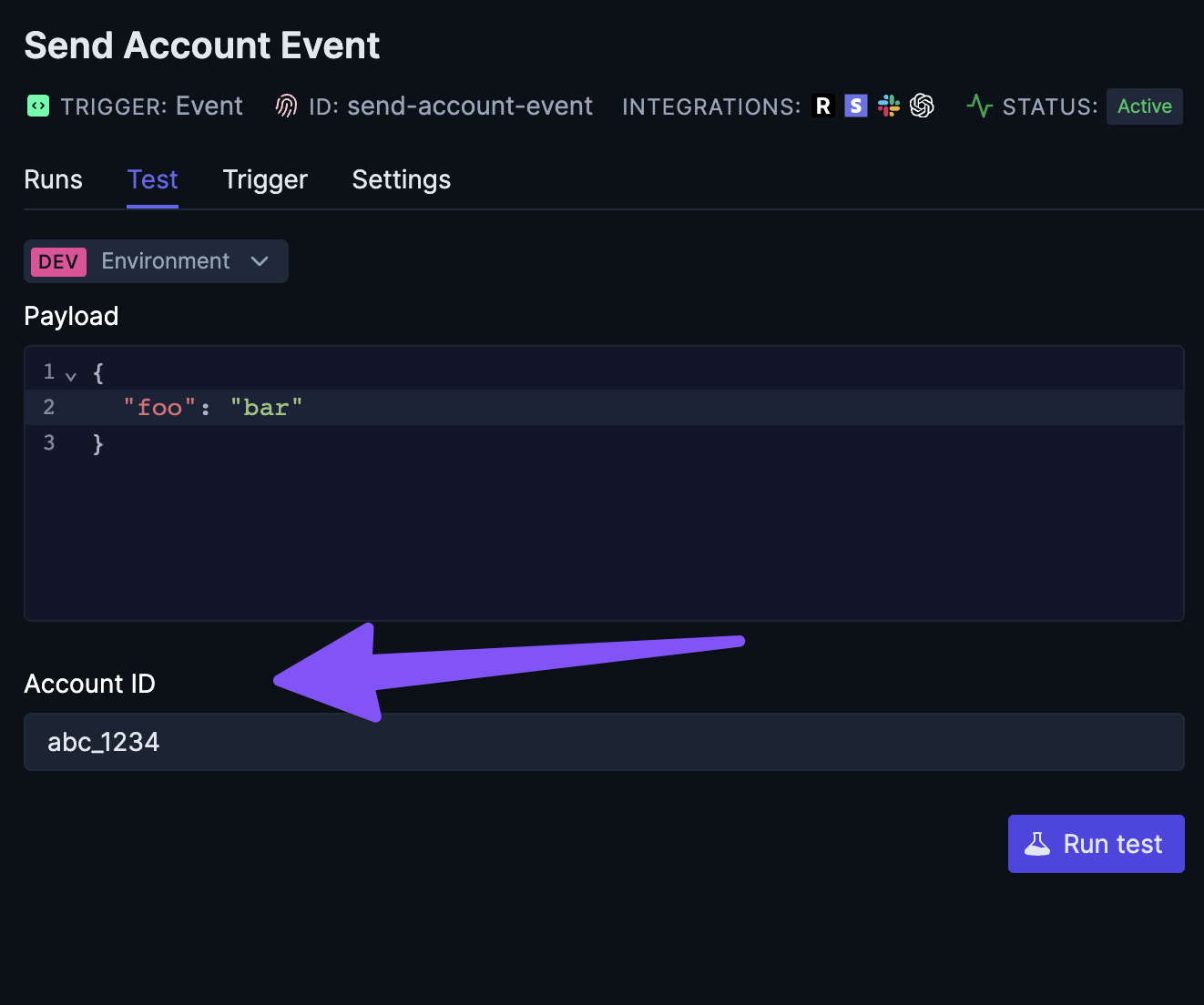
If a job uses any integrations with an Auth Resolver that requires an account ID, you'll need to provide an account ID when testing the job:
# Auth Resolver reference
The Auth Resolver callback has the following signature:
```ts
type TriggerAuthResolver = (
ctx: TriggerContext,
integration: TriggerIntegration
) => Promise;
type AuthResolverResult = {
type: "apiKey" | "oauth";
token: string;
additionalFields?: Record;
};
```
The `ctx` parameter is the [TriggerContext](/sdk/context) for the run and the `integration` parameter is the [TriggerIntegration](/sdk/integrations) instance that the Auth Resolver is being called for. You can use the `integration` parameter to check the `id` of the integration to determine which integration the Auth Resolver is being called for:
```ts
client.defineAuthResolver(slack, async (ctx, integration) => {
if (integration.id === "byo-slack") {
// do something
}
});
```
You can also return `additionalFields` in the Auth Resolver result which will be passed to the integration when making requests. This is useful if you need to provide additional fields to the integration that are not part of the standard integration options.
```ts
client.defineAuthResolver(shopify, async (ctx, integration) => {
return {
type: "apiKey",
token: "my-api-key",
additionalFields: {
shop: "my-shop-name",
},
};
});
```