> ## Documentation Index
> Fetch the complete documentation index at: https://trigger-v3-fix-additional-files.mintlify.site/llms.txt
> Use this file to discover all available pages before exploring further.
# OpenAI overview & authentication
## Overview
Our OpenAI integration allows you to easily perform AI-powered tasks, such as summarizing text, answering questions, generating images, fine tuning and much more.
## Installing the OpenAI packages
```bash npm
npm install @trigger.dev/openai@latest
```
```bash pnpm
pnpm add @trigger.dev/openai@latest
```
```bash yarn
yarn add @trigger.dev/openai@latest
```
## Authentication
To use the OpenAI API with Trigger.dev, you'll need an API Key from OpenAI.
If you don't have one yet, you can obtain it from the [OpenAI dashboard](https://platform.openai.com/account/api-keys).
```ts
import { OpenAI } from "@trigger.dev/openai";
const openai = new OpenAI({
id: "openai",
apiKey: process.env.OPENAI_API_KEY!,
});
```
## Tasks
Once you have set up a OpenAI client, you can add it to your job and start using the provided tasks:
```ts
client.defineJob({
id: "openai-job",
name: "OpenAI Job",
version: "1.0.0",
trigger: invokeTrigger(),
integrations: {
openai, // Add the OpenAI client as an integration
},
run: async (payload, io, ctx) => {
// Now you can access it through the io object
const completion = await io.openai.chat.completions.create("completion", {
model: "gpt-3.5-turbo",
messages: [
{
role: "user",
content: "Create a good programming joke about background jobs",
},
],
});
},
});
```
As you can see above, we've replicated the API of the [OpenAI TypeScript SDK](https://github.com/openai/openai-node), with a crucial difference of adding the [Task Cache Key](https://trigger.dev/docs/documentation/concepts/tasks#task-cache-keys) as the first parameter.
We've also added a few convenience methods to make it easier to work with the OpenAI API, especially in a serverless environment. For example, you can run a Chat Completion task in the background with [backgroundCreate()](/integrations/apis/openai/chat#completions-backgroundcreate):
```ts
const completion = await io.openai.chat.completions.backgroundCreate("completion", {
model: "gpt-3.5-turbo",
messages: [
{
role: "user",
content: "Create a good programming joke about background jobs",
},
],
});
```
See our full task reference below:
Given a list of messages comprising a conversation, the model will return a response
Build assistants that can call models and use tools to perform tasks
Upload files to use with assistants and fine-tuning
Given a prompt and/or an input image, the model will generate a new image
Manage fine-tuning jobs to tailor a model to your specific training data
List and describe the various models available in the API
Given a prompt, the model will return one or more predicted completions.
## Usage as Universal Client
You can use our OpenAI integration as a universal client to interact with other OpenAI-compatible APIs, such as [Perplexity.ai](https://docs.perplexity.ai/)
```ts
import { OpenAI } from "@trigger.dev/openai";
const perplexity = new OpenAI({
id: "perplexity",
apiKey: process.env["PERPLEXITY_API_KEY"]!,
baseURL: "https://api.perplexity.ai",
icon: "brand-open-source",
});
```
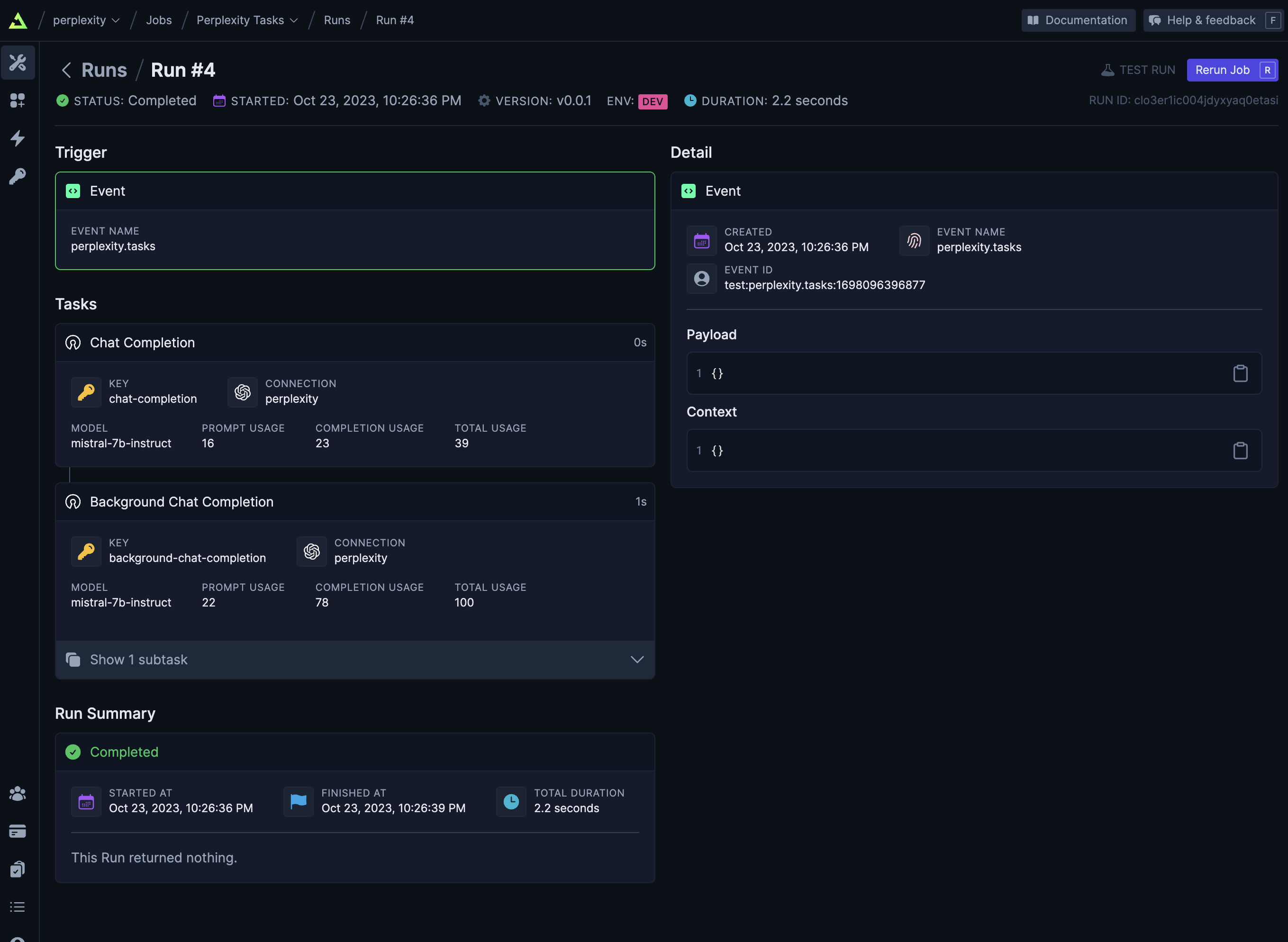
Since [Perplexity.ai](https://docs.perplexity.ai/) is compatible with OpenAI, you can use the same tasks as with OpenAI.
```ts
client.defineJob({
id: "perplexity-tasks",
name: "Perplexity Tasks",
version: "0.0.1",
trigger: eventTrigger({
name: "perplexity.tasks",
}),
integrations: {
perplexity,
},
run: async (payload, io, ctx) => {
await io.perplexity.chat.completions.create("chat-completion", {
model: "mistral-7b-instruct",
messages: [
{
role: "user",
content: "Create a good programming joke about background jobs",
},
],
});
// Run this in the background
await io.perplexity.chat.completions.backgroundCreate("background-chat-completion", {
model: "mistral-7b-instruct",
messages: [
{
role: "user",
content: "If you were a programming language, what would you be and why?",
},
],
});
},
});
```
And you'll get the same experience in the Run Dashboard when viewing the logs:
## Example jobs
Check out pre-built jobs using OpenAI in our API section.